

Description
Dark Mode Chrome Theme with FHD Wallpaper
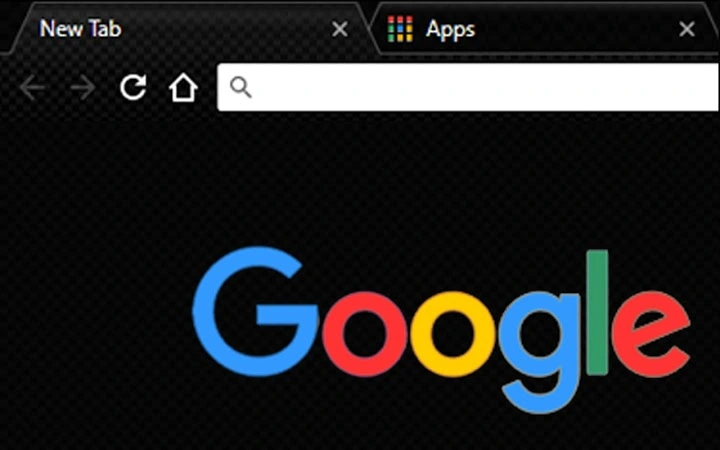
Carbon Blackout Theme is a desktop application designed to enhance the browsing experience through a visually striking dark theme. It features a high-resolution 1080 x 1920 FHD background wallpaper, optimized for medium to large computer monitors and TV screens. The theme is tailored for users seeking a sleek, modern interface that reduces eye strain and improves focus during extended browsing sessions. It is ideal for professionals, content creators, and casual users who prioritize aesthetics and visual comfort.
Overview
The Carbon Blackout Theme transforms the Chrome browser interface with a minimalist, dark aesthetic centered around a 1080 x 1920 FHD wallpaper. This design is intended to provide a clean, distraction-free environment for web navigation. The theme is specifically developed for users who prefer dark mode interfaces, which are known to reduce screen glare and improve visibility in low-light conditions. It is particularly suited for individuals who spend long hours online, such as remote workers, digital artists, and students.
The developer, ChromeThemer.com, offers a range of similar themes, suggesting a focus on customizable browser experiences. While no additional developer background is provided, the consistent release of free themes indicates a commitment to user accessibility. The theme is designed to be used directly within the Chrome browser, with no external installation required beyond the standard Chrome extension process. Real-world usage includes enhancing visual comfort during evening browsing, improving screen clarity on larger displays, and personalizing the browser’s appearance for a more cohesive digital workspace.
Key Features & Capabilities
- FHD Wallpaper (1080 x 1920) – A high-definition background optimized for most medium to large computer monitors and TV screens, ensuring sharp visuals without distortion.
- Dark Mode Interface – A sleek, black-based theme that reduces screen brightness and minimizes eye strain during prolonged use.
- Browser Integration – Seamless installation and application within the Chrome browser without requiring system-level changes.
- Free to Download – No cost to access or use the theme, with no hidden fees or subscription models.
- Lifetime Updates – The theme is guaranteed to receive updates indefinitely, ensuring compatibility with future Chrome releases.
These features allow users to maintain a consistent visual identity across their digital environment. For example, a graphic designer might use this theme to reduce visual fatigue while reviewing color palettes, while a student could benefit from reduced glare during late-night study sessions. The theme’s compatibility with large displays makes it suitable for multi-monitor setups or media consumption on TV screens. The free and update-friendly model supports long-term usability without the need for re-purchase.
User Interface, Workflow & Performance
The user interface of the Carbon Blackout Theme is entirely contained within the Chrome browser environment. It modifies the browser’s default appearance, including the toolbar, tab bar, and new tab page, to align with the dark aesthetic. Navigation remains consistent with standard Chrome behavior, ensuring that users experience no disruption in workflow. The theme does not introduce new menus, toolbars, or interactive elements, which helps maintain a lightweight and efficient browsing experience.
Performance impact is expected to be minimal, as the theme consists solely of visual styling with no background processes. The developer did not specify resource usage details. Stability is likely high, given the theme’s simple design and lack of complex functionality. CPU and RAM behavior are not documented, but typical dark themes do not significantly affect system performance. The theme is designed to load instantly upon activation, with no noticeable delay during startup or navigation.
Compatibility & System Requirements
Carbon Blackout Theme is compatible with Windows and Mac operating systems, supporting the latest versions of the Chrome browser. The installation size is 2.5 MB, indicating a lightweight footprint that will not consume significant disk space. The theme is optimized for displays with a resolution of 1080 x 1920, making it ideal for FHD monitors and large TVs. The developer did not provide additional system requirements.
Compatibility information is limited to the supported platforms and browser. No specific hardware specifications were listed. Users should ensure they are running a current version of Chrome to avoid potential display issues. The theme may not render correctly on older systems or non-standard display configurations, though no such cases were documented. Installation is straightforward through the Chrome Web Store, requiring no administrative privileges.
Pros and Cons
Pros
- High-quality FHD wallpaper optimized for large screens
- Free to download and use with lifetime updates
- Minimal performance impact due to lightweight design
- Easy integration with Chrome browser
- Designed for reduced eye strain in low-light environments
Cons
- No support for 4K resolution or higher
- Limited to Chrome browser only
- Visual customization options are minimal
- Updates are automatic but not user-controlled
- Developer website is required for additional themes
FAQ Section
Is Carbon Blackout Theme compatible with all Chrome versions?
The theme is designed for current Chrome releases. Compatibility with older versions is not guaranteed, and users are advised to keep their browser updated.
Is the theme safe to install?
Yes, the theme is hosted on ChromeThemer.com and distributed through the official Chrome Web Store, which enforces security checks on all extensions and themes.
Can I use this theme on multiple devices?
Yes, as long as you are signed into the same Google account on different devices, the theme will sync across your Chrome browsers.
Does the theme require an internet connection to work?
Once installed, the theme functions offline. However, updates are delivered through the Chrome Web Store and require an internet connection.
Are there any licensing restrictions?
The theme is free to use with no restrictions. It comes with lifetime updates and can be used for personal or professional purposes without additional fees.
Final Thoughts + CTA
Carbon Blackout Theme delivers a clean, professional dark mode experience with a high-resolution FHD wallpaper tailored for modern displays. Its lightweight design ensures minimal impact on system performance, while the free, update-enabled model supports long-term usability. While it lacks advanced customization and 4K support, it excels in simplicity, visual appeal, and eye comfort. Ideal for users who value a distraction-free browsing environment and a consistent dark aesthetic, this theme is a solid choice for Chrome users on Windows and Mac.
Download Carbon Blackout Theme now
Guides & Tutorials for Carbon BlackOut Theme for Chrome
How to install Carbon BlackOut Theme for Chrome
- Click the Preview / Download button above.
- Once redirected, accept the terms and click Install.
- Wait for the Carbon BlackOut Theme for Chrome download to finish on your device.
How to use Carbon BlackOut Theme for Chrome
This software is primarily used for its core features described above. Open the app after installation to explore its capabilities.
User Reviews for Carbon BlackOut Theme for Chrome 0
No reviews found





